A popup in WordPress is a box that appears on your screen when triggered by an action. Done well, they grow email lists, drive sales, and grab attention fast. Popups aren’t just welcome messages. This is the ultimate beginner’s guide to using popups, from finding the best WordPress popup plugin to choosing the right one to drive conversions today.
What Is a Popup in WordPress, and Do They Still Work in 2026?
A popup is a floating box that appears on a website when triggered by a user’s action. Actions include landing on the home page, scrolling past a certain point in the webpage, or clicking a button. Most popups serve a purpose. They offer discounts in exchange for an email address, display important announcements, or offer last-minute, exclusive deals before a user exits a page.
A Reddit user said, “I have a welcome pop-up for 15% off. Started my business two years ago and have 40k emails from it. It has a 10% submit rate.”
Popups are undeniably effective if they are well-timed and add value; they still work today.
How WordPress Popups Work
Most WordPress popups are managed through plugins. If you’re new to WordPress, it’s the world’s most popular website builder. You can think of plugins as app store downloads that add new features to your site with no coding. A WordPress popup builder is perfect for beginners who need to easily create fully customizable popups. Many popup plugins have their own templates, making them easy to use.
Types of Popups in WordPress
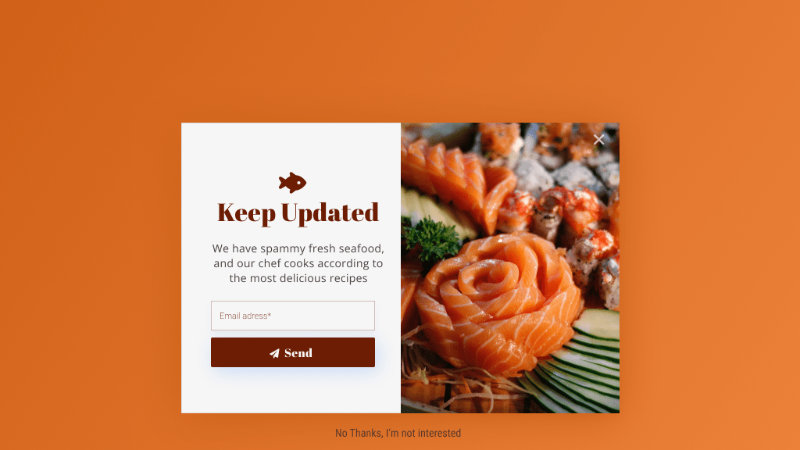
Exit-Intent Popups
Exit-intent popups are probably the cleverest popup type on this list. They are fired when someone is about to leave your page, and their mouse moves toward the exit button. You are catching them at a moment that matters. These popups are great for eCommerce stores that want to recover abandoned carts.
Idea: Offer free shipping to help users make a decision.
Time-Based Popups
These are all about timing. Instead of immediately displaying a popup the second someone visits your page and scaring the user away with intrusive content, wait. The popup only appears once a visitor is engaged (after 7-15 seconds), which builds rapport and curiosity.
Scroll-Triggered Popups
If a user scrolls halfway down a page, they are officially “interested” in your content. They are much more ready to accept an offer because they already enjoy your content, and they want to know more. If a user reaches 50% or 30% of the way down a page, a popup appears.
Idea: When a reader reaches the middle of a blog post, trigger a popup asking them to join your newsletter for more tips and exclusive content.
Click-Triggered Popups
The click-triggered popup is triggered when a visitor clicks a specific element, image, or button. The popup can feel like a natural extension of clicking, which makes it more targeted. These types of popups have one of the highest conversion rates.
Idea: Use CTAs to reveal exclusive offers.
Welcome Mats and Full-Screen Overlays
These popups are very effective and bold, taking up most of the screen when a user enters a webpage. You can’t miss them.
Idea: Use this for a new product launch, make sure no one misses your new offerings.
Slide-ins and Notification Bars
Slide-ins are designed to be noticed without being too intrusive, suiting more minimalistic or elegant brands. They are smaller and are often placed off-center, allowing the user to keep reading while keeping the offer in mind.
Other popup types include surveys, video popups, and lead magnet popups, where you download a file in exchange for an email address. Another common and often necessary popup in WordPress includes the Cookie banner.
How to Create Popups in WordPress
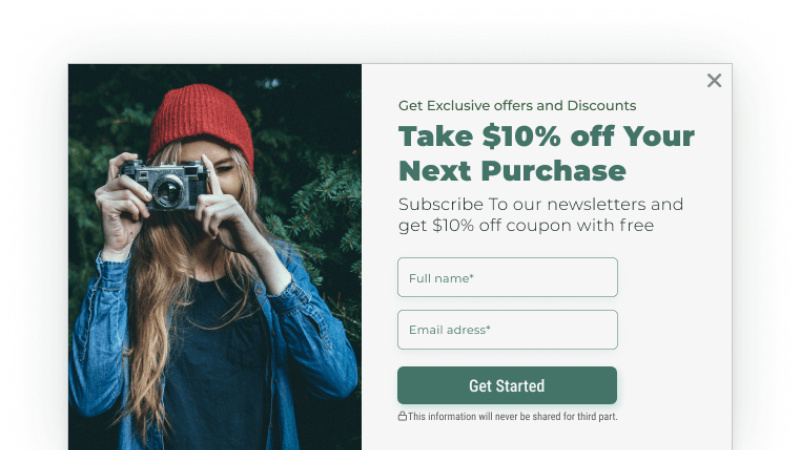
You can create popups quickly and efficiently by using WordPress plugins. Plugins allow you to easily build popups by installing them on your WordPress site without needing to know code. Popular WordPress plugins include PopupBox, OptinMonster, and Elementor Pro.
How to Add Popups Using a Plugin
Here is what you need to do to install a popup plugin:
1. Choose your plugin based on your objectives.
2. Install your plugin on WordPress.
3. Activate your plugin.
4. Connect your plugin to your email list.
Most people use popups to grow an email list. You’ll want to look for the Integrations or Settings tab within the plugin for services like Mailchimp or HubSpot.
Using a WordPress Popup Builder: Step-by-Step Example
How to create a popup in WordPress will depend on your editor and chosen plugins, but the WordPress PopupBox Plugin follows these simple, easy-to-use steps.
1. Go to your WordPress Dashboard.
2. Select Plugins on the menu on the side and press “Add New.”
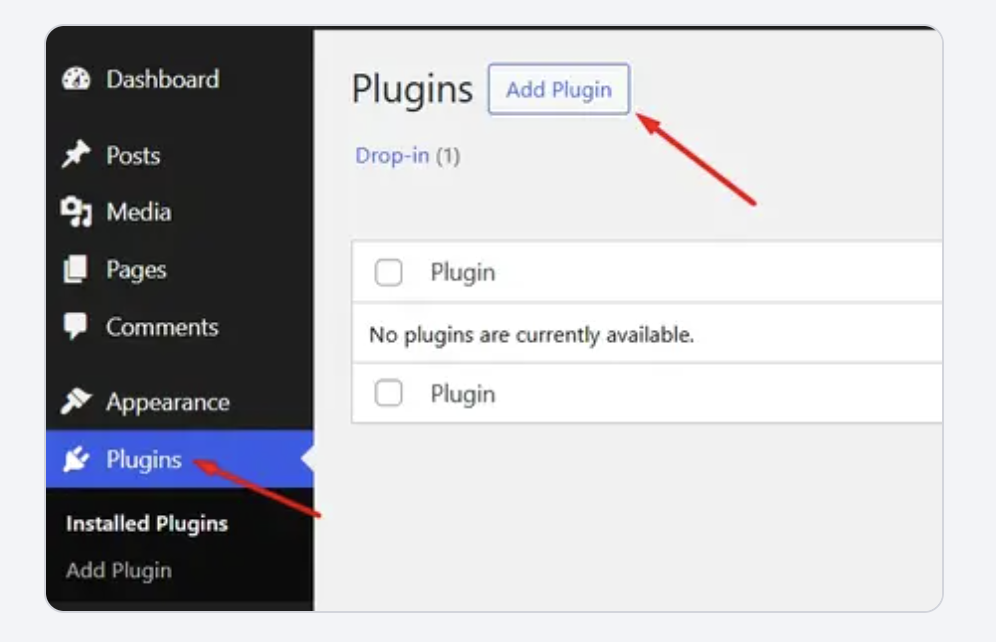
3. Search for the plugin, such as PopupBox.
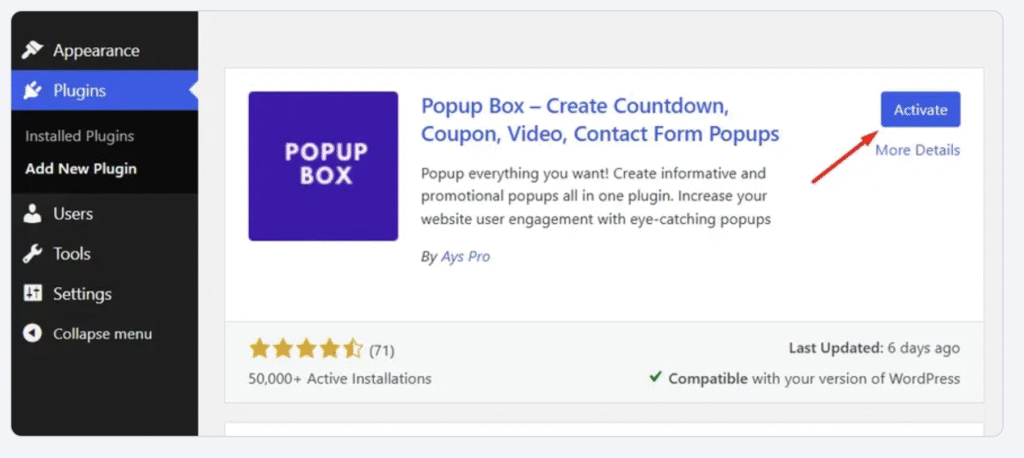
4. Click Install Now, then Activate.
5. View the “PopupBox” menu item on the left side of your dashboard.
6. Click on PopupBox > Create Popup.
7. Choose your popup type.
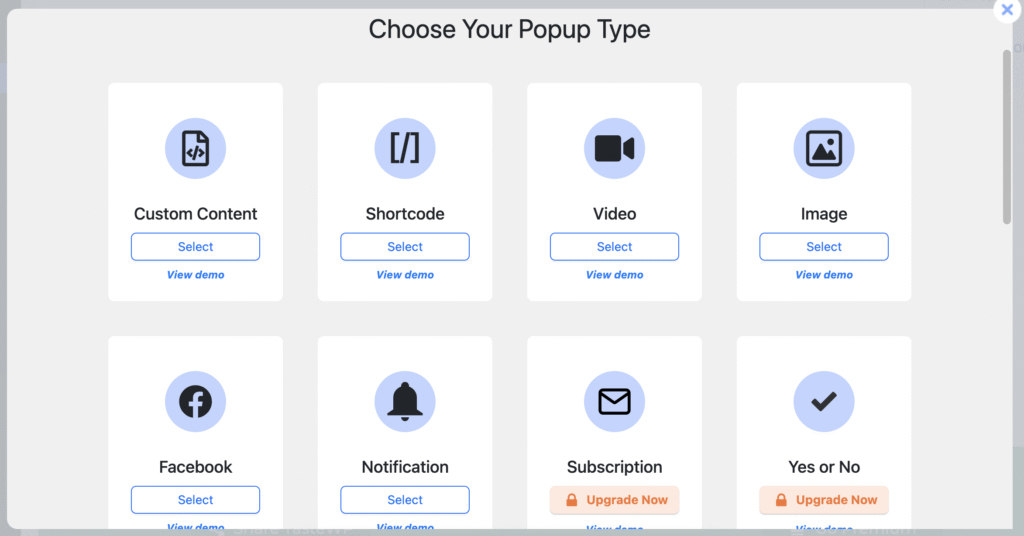
8. Browse ready-made templates.
9. Choose display options: decide where to show your popup.
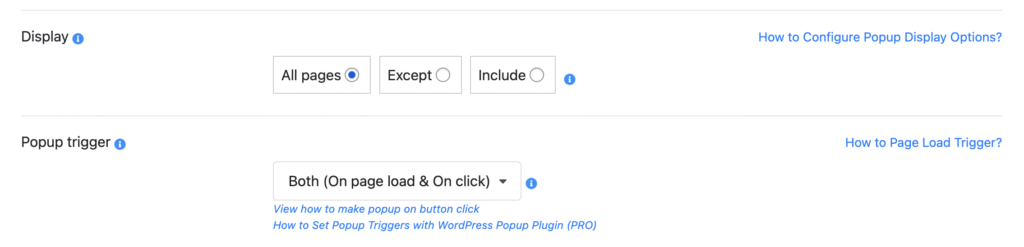
10. Choose popup triggers: on page load, click, exit-intent, or both.
11. Customize your copy under the popup description.
12. Decide on your popup position.
13. Choose when and how the popup will open and close.
14. Adjust how many times the popup will be displayed per session.
15. Optimize your popups for different formats and test them.
Here is a more detailed guide on how to set up PopupBox successfully.
The Best WordPress Popup Plugins Compared
| Plugin | Free Version | Starting Price | Popup Types | Best For | Key Features | Standout Feature |
| PopupBox | Yes | $29/year (Business) $59/year (Developer) | 15+ | All skill levels | Smart triggers, analytics, 70 customization options, WooCommerce & form integration | High customization (70+ options) and trusted by 50,000+ sites |
| OptinMonster | No | ~$9/month | 9+ | Marketers and agencies | Exit-intent, A/B testing, advanced targeting, 500+ templates | Most powerful targeting rules |
| Popup Maker | Yes | Free / ~$87/year Pro | 5+ | Beginners | Unlimited popups, basic targeting, and shortcode support | Best free starting option |
| Elementor Popup Builder | No | ~$59/year (Pro) | 10+ | Elementor users | Drag and drop builder, 100+ templates, theme builder integration | Seamless Elementor integration |
| ConvertPro | No | ~$99/year | 10+ | Advanced marketers | A/B testing, advanced triggers, and mobile editor | Best A/B testing for mid-range budget |
How to Choose the Best WordPress Popup Plugin
Choosing the best WordPress popup plugin depends on what you’re trying to do. A blogger growing a newsletter has very different needs from an eCommerce store. But, there are some essential functions every plugin should have: great templates, precise targeting, and email platform integrations. Beginners should look for these non-negotiable elements.
Tip: Choose a popup plugin with good customer service. Support is very helpful to beginners.
Free vs. Paid Popup Plugins
There are free options available. But if you want more features, templates, and functionality, then paying for a popup plugin is worth it. E-commerce stores, growing businesses, and serious marketers should use a premium option. The good news is that there are many affordable ones available.
What Features to Look For
These are the best features to look for in 2026 when using popups:
Smart Triggers like exit-intent, scrolling, and time-based functionality
Targeting Rules so your popups can show on specific pages
Mobile Responsiveness, so your popup is customizable
Templates and different popup types for efficiency and ease of use
Analytics to track your popup’s effectiveness
UX Best Practices for Popups
What to Do
Your popup on WordPress should feel targeted, intentional, and not intrusive.
- Make the popup easy to escape.
- Time your popup so it doesn’t feel spammy.
- Keep it relevant to your popup type and trigger.
- Prioritize value to boost conversion.
- Keep your copy simple yet effective.
- Make the popup visually appealing.
- Use your brand’s colors and tone of voice
- Use “cookies” to ensure you are legally tracking information and being transparent.
Find out more about the Cookie Consent Popup.
Common Mistakes to Avoid
Showing a popup the exact moment a page loads can be seen as spammy. Here are other common mistakes to avoid:
- Don’t show your popup on multiple pages.
- Do not show your popup for repeated sessions by a single user.
- Don’t ask for too much information; make the user experience as seamless as possible.
Ask yourself, would I enjoy this user experience? Your answer will guide you.
What Popup Should You Start with?
There are lots of popup types and examples, so what should you start with? The best place to start is with the scroll-triggered popup. Your visitors won’t find it annoying. You can easily add value at this point. For example:
Liking this? We think you’ll love this more.
Get this blog in a simple, one-page checklist.
Here’s 10% if you decide to check out.
A user said they displayed a popup on 75% of page scrolls or 2 page views. This gives people an understanding of your website before they are hit with a popup. It feels intentional and strategic.
After running a popup for 2 weeks, check the metrics. Remember to change one element at a time or implement A/B testing to accurately track your popup’s results. If not enough users are reaching 75% or 50% of your page, try a time-based popup and monitor your results.
Start small, change incrementally, and continuously experiment.
Final Thoughts

Popups get a bad reputation, but they shouldn’t. If they’re relevant, well-timed, and genuinely useful to the visitor, they work at increasing conversions.
Keep experimenting and optimizing your pop-ups; that is where the magic of conversions happens.
FAQs: Popups in WordPress
A popup in WordPress is a box that appears on a page, triggered by user behavior. They are used to grab attention by sharing news, driving conversions at pivotal moments, and growing email lists in exchange for value or information.
In 2026, popular WordPress plugins include PopupBox and Popup Maker.
Yes. If you are comfortable with basic HTML, CSS, and JavaScript, you can manually code a popup.
Only if they are intrusive. Google doesn’t penalize popups; it penalizes bad user experiences, which include a slow website or high bounce rates. Prioritize the user experience and your popups will not affect your website’s SEO.
Yes! In fact, video popups are a huge trend right now because they are so engaging. Plugins like PopupBox have a video embed function.