You are thinking about using popups, but have wondered, “Are popups bad for SEO?” Does Google hate or tolerate them? Google’s 2025 updates put more emphasis on user satisfaction and the mobile experience. So badly designed popups will hurt you more than before. Yet, Google doesn’t hate all popups; high-converting popups like exit-intent and click-triggered popups don’t disrupt the user experience and convert users. But there are some website overlays you should avoid this year.
Are Popups Bad for SEO?
In short, popups aren’t necessarily bad for SEO. They are only bad for SEO if they are intrusive, poorly implemented, or timed. Some of the best popups to use in 2026 include exit-intent popups, click-triggered popups, and popups which are optimized for mobile experiences. Popups that appear too quickly or without relevance are spammy and will be penalized. Google has also shown that it penalizes interstitials, full-screen website overlays that are illogical or disruptive. When using popups in 2026, there are strict guidelines you need to follow.
What is a Popup in WordPress: The Ultimate Beginner’s Guide to Using Them (2026)
Google Update 2025: What It Says About Popups
Several times a year, Google makes major updates that affect the algorithm. The latest Google update in December 2025 brought new sweeping changes. Among them, we can find answers to the question on our minds: “Are popups bad for SEO?”
The Golden Thread: Google prioritizes relevant, satisfying content, and real user value.
Google is getting stricter about the user experience and relevance. Here’s the catch, especially on mobile devices. They are making this even clearer in 2026.
What Google Considers a Negative Experience?
These are all signals that Google doesn’t like.
UX Experience
You are forced to view a full-screen overlay covering the main content before reading.
A popup appears before you even have the opportunity to click on anything.
Popups that look like ads and disrupt the user experience, even if they do not cover the main content.
You have to scroll before viewing the main content.
Broader User Engagement Signals
Similarly, popups could be affecting more technical aspects or hinting at the overall user experience. Here are those signals:
Bad LCP (loading speed): popups that use heavy coding are slowing down your site, especially JavaScript-heavy popups. Google has a tool you can use to check your page speed: PageSpeedInsights.
CLS (layout shifts when a popup pushes content): the main content is displaced by a badly timed or chaotic popup appearing suddenly.
Bounce Rate: users are landing on your page and then leaving immediately as a result of an aggressive popup or negative user experience.
Engagement Time: Users are spending less time on your page. A good popup should engage users and increase time on the page, not have the opposite effect.
Popups Google Considers “Intrusive”
Are popups bad for SEO? If they are intrusive, yes. Intrusive popups are those that appear too soon, disrupt the user journey, or negatively affect a website’s key vital signals, which include a page’s bounce rate and engagement rate.
Here are what popups to avoid in 2026:
Full-screen popups covering the main content without logical reasoning.
Timed popups that show instantly before a user can read anything.
Hard to close popups that disrupt the mobile experience.
Flashy popups that look alarming and degrade your website’s quality.
Note: some popups are unavoidable and large to convey important information like payment details, confirmation codes, or age-gates. Other unavoidable popups include the Cookies banner. Understand the differences between Website Overlays and Their Key Difference Here.
Popups That Are Safe (and Even Recommended)
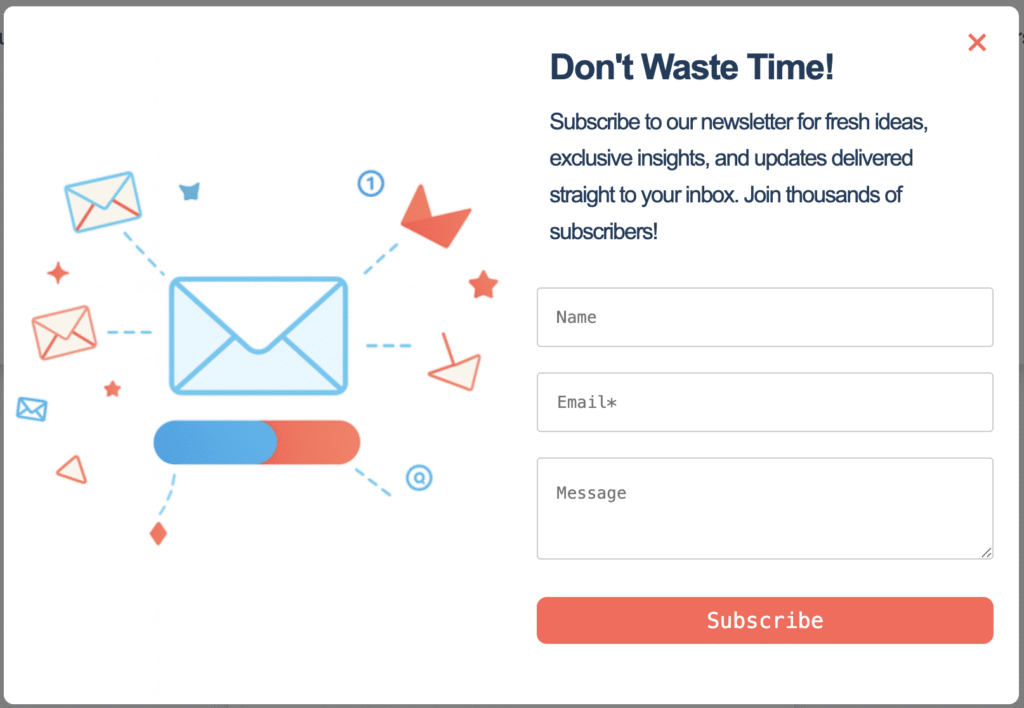
Popups are still effective conversion tools, especially when they are targeted and relevant to the user experience. Effective popup use will not affect SEO and convert users.
1. Exit-Intent Popups
Exit intent is designed to reduce bounce rate, cart abandonment, and convert users. Common types include cart recovery, promotional offers, and email capture. They are unique because they are triggered when a user signals that they are about to leave a page. They do not disrupt the journey; they enhance it.
Here is How to Use Exit-Intent Popups That Convert Users in 2026
2. Click-triggered Popups
Your popup appears when a user clicks on a specific element. The popup feels like a natural extension of the click, feeling very natural. For example, a “learn more button” activates a popup with an FAQ. These popups can be interactive and feel very engaging. Learn more about on-click triggers here.
3. Delayed popups (not immediate)
The page load trigger is very popular, especially if you want to instantly share information or grab attention. You can use this popup, but do not display it immediately. It can be combined with open delay or limitations to make the popup feel less intrusive.
4. Cookie Consent
In some countries, you have to consent to websites using your data, also known as the Cookie banner. A Cookie popup can also be a slide-in or appear at the bottom of the page without disrupting the user journey. These are often easy to dismiss and unobtrusive.
Popups and SEO: What You Need to Know About Mobile
Most people don’t understand that users interact with content differently depending on the device they are using. More and more people are using mobile phones to browse today. As a result, Google is getting stricter about the user experience on mobile. Mobile and desktop should be treated differently and optimized accordingly.
Why Mobile Screens Are More Sensitive to Popups
A mobile screen is smaller, functionality is more limited, and touch targets are harder to use. It offers a more limited user experience in every way.
- CTA or close buttons are trickier to use
Buttons are smaller and harder to tap accurately with a finger.
- Text visibility is smaller.
Popups on mobiles compress to fit on a mobile screen. Text appears smaller and harder to read.
- Scroll behavior is more important.
People scroll differently on mobiles. People also scroll faster on mobile, reflecting the quick skimming behavior that defines how most people browse on their phones.
How Google Evaluates Mobile Accessibility
Through tools like Google Search Console’s Mobile Usability report and Lighthouse audits, Google actively flags pages where interactive elements are too close together, text is too small, or content is blocked.
The Rule of Thumb for Mobile
If your popup covers more than 30–40% of the screen height on mobile, you’re at risk. At 30–40% coverage, the user can still get a feel for the content behind the popup.
You can also use popups that sit at the bottom third of the screen, use a small slide-in format, or certain engagement metrics like timed slide-ins on blog content to trigger a popup.
Popup Types and Their SEO Risk Levels
Are popups bad for SEO? Here is a quick table to help you understand each popup type’s risk level.
| Popup Type | SEO Risk Level | Why It’s Risky or Safe | Real-World Example |
| Full-screen mobile interstitial | High | Covers all content immediately on mobile; blocks access before the user reads anything. | Newsletter signup appears the moment someone lands on a blog post from Google Search. |
| Time-based overlay (immediate) | Medium-High | Triggers within 0–3 seconds of page load; user hasn’t engaged yet; feels disruptive. | Coupon code popup appearing 2 seconds after landing on an e-commerce product page. |
| Time-based overlay (delayed) | Medium | Triggers after 15–30 seconds; user has had some time to engage; less disruptive but still an overlay. | “Get 20% off” offer appearing after 20 seconds on a SaaS pricing page. |
| Full-screen desktop interstitial | Medium | Less risky than mobile, but still intrusive if it appears before content is consumed. | Seasonal promo covering the homepage before the user sees any product information. |
| Scroll-triggered popup | Low | Only appears after the user has scrolled and engaged; content was already accessible. | Content upgrade or free guide offer appearing after 50% scroll on a blog article. |
| Side or corner slide-in | Low | Small footprint; doesn’t block content; easy to dismiss; feels like a suggestion, not a demand. | Newsletter signup sliding in from the bottom right after 30 seconds on a recipe or editorial site. |
| Sticky top or bottom bar | Low | Minimal screen coverage; doesn’t shift content if loaded correctly; stays within safe CLS range. | Announcement bar promoting a limited-time offer or free shipping threshold on an e-commerce site. |
| Exit-intent popup (desktop) | Very Low | Triggers only when the user moves to leave; the content experience is already complete; no interruption. | “Wait, here’s 10% off” popup appearing as a user moves their cursor toward the browser close button. |
| Exit-intent popup (mobile) | Medium | Mobile exit-intent is less reliable and can misfire on scroll gestures, creating unintended triggers. | Subscription offer fires unexpectedly when a user scrolls quickly or switches tabs on mobile. |
| Cookie consent banner | Exempt | Required by law in many regions, Google explicitly excludes legal compliance popups from penalties. | GDPR cookie notice appearing at the bottom of the screen on any EU-facing website. |
| Age verification gate | Exempt | Legally required for certain content; Google treats it as a necessary barrier, not an intrusive one. | Age confirmation popup on alcohol, gambling, or adult content websites. |
| Login or paywall prompt | Exempt | Google allows paywalled content with proper structured data; login prompts for members-only content are safe. | “Sign in to read the full article” prompt on a subscription news or SaaS documentation site. |
Best Practices: How to Use Popups Without Hurting SEO
In summary, popups themselves aren’t bad for SEO; a bad user experience is. Here are more tips on how to create SEO-friendly popups:
- Delay popups until after a scroll event or scroll (70%)
- Choose a mobile-first design: bigger close button, minimal screen coverage
- Do not show popups to returning users
- Keep a clear CTA
- Make your popups easily dismissible
- Make your popups relevant and timely
- Test your page load speed and keep an eye on your engagement metrics
Do A/B testing and test key metrics that not only concern your conversion, but also consider the page’s engagement time, bounce rate, and user sentiment.
Choose a plugin that supports creating well-designed and functional popups like PopupBox.
Finally: Should You Use Popups?
You may think, “Are popups bad for SEO?” They don’t have to be. Popups are a great way to draw attention, convert readers, or grow your email list. Sometimes, they are even legally required. When using popups in 2026, make them SEO-friendly by following the golden rule: prioritizing the user experience and adding value.
FAQs Section: Popups and SEO
Badly displayed popups can indirectly affect SEO by disrupting the user experience, decreasing engagement time and increasing the bounce rate.
No, exit-intent popups are the best popups to use for SEO as they don’t disrupt the user experience; they are only triggered when a user signals they want to leave the page.
Google penalizes popups that disrupt the user experience; they are displayed immediately, take up the whole screen, or feel jarring.
JavaScript-heavy popups can slow loading speed. But many lightweight plugins like PopupBox do not slow down websites and are very easy to use.
Yes. Mobile popups have a different set of rules. Text visibility is smaller, buttons are more difficult to use, and scroll behavior is more important than on a desktop.